Forex Pasha

Wednesday, 26 January 2022

99%Best Trading Forex System 2022&Strategies MT4|Accurate Forex Trading System for MT4 free download

11:04 3
99%Best Trading Forex System 2022&Strategies MT4|Accurate Forex Trading System for MT4 free download

99%Best Trading Forex System 2022&Strategies MT4|Accurate Forex Trading System for MT4 free download

When Buying:

1. Buy from the close of a candle above a support level 2. The price difference between the support level we are buying from and the next resistance line is ATLEAST 50 pips. 3. The stochastic must be below or at the 20 line 4. The candle must close 20 pips at most above the level (must be 20 pips and below) 5. You must wait for the close of the four hours candle before you enter. 6. The 4 hours time frame respects the 4 hours levels (Green levels) the most. 7. The daily time frame respects the daily levels (Blue levels) the most. 8. Watch the daily chart for opportunities and to further estimate the risk of your trade on the 4 hours chart. 9. It is preferable not to go against the trend, and don't go against the trend when you first start using the strategy. Always zoom out of the chart to identify the trend 10. Disrespected levels are the levels which get too many candlestick closings above/below it then back below/above it. 11. The disrespected levels must get respected in a wave test (test done in a wave movement) and if the level gets respected in the last wave test, we buy when conditions line up. 12. Fresh levels which never have been disrespected before are good to go. 13. Be careful not to enter from disrespected levels. And the Vise-versa when selling Green: 4 hours Blue: Daily Red: Weekly Pink: monthly Please completely ignore the gray channel on the chart, as it repaints a lot and it is just there to remindus if there is an actual real channel there. We use a real channel with at least two bottoms when buying(only when the channel coincides with a good level, that's when we know that the level is less risky.Also the vise-versa when selling, we use the channel if it is connecting at least two tops.


Saturday, 5 December 2020

Intraday Moving Average MACD 100% Profitable Trend Trading System Moving Average crossover strategy

14:21 7
Intraday Moving Average MACD 100% Profitable Trend Trading System Moving Average crossover strategy

Intraday Moving Average MACD 100% Profitable Trend Trading System Moving Average crossover strategy

Average Convergence Divergence (MACD) is a fast moving indicator following a trend that shows the relationship between the two rising averages of the price of security. The MACD is calculated by subtracting the 12-term EMA from the 26-term Fast Moving Average (EMA). The result of this calculation is the MACD line. The MACD's nine-day EMA, called the "signal line", is followed by a plot at the top of the MACD line, which can act as a signal buying and selling stimulus. ۔ You can buy securities when the MACD crosses above your signal line and sell securities - or short sell - when the MACD crosses below the signal line. The average convergence divergence (MACD) indicator can be interpreted in several ways, but the more common methods are crossover, divergence, and rapid growth.


Free Download Intraday Moving Average MACD 100% Profitable Trend Trading System


Free Download

intraday trading
intraday trading for beginners
intraday trading tips
intraday trading strategy
intraday trading stocks
successful intraday trading strategies
intraday trading formula
intraday trading rules
macd ema strategy tradingview
macd trading strategy

Saturday, 10 October 2020

95%Profitable Intraday Forex Trading System | Successful Intraday Trading Strategies For Beginners

11:15 15
95%Profitable Intraday Forex Trading System | Successful Intraday Trading Strategies For Beginners

95%Profitable Intraday Forex Trading System | Successful Intraday Trading Strategies For Beginners

95%Profitable Intraday Forex Trading System | Successful Intraday Trading Strategies For Beginners


Successful Intraday Trading Strategies For Beginners
95%Profitable Intraday Forex Trading System
Successful intraday trading strategies,Intraday trading strategies formulae
100% Profitable Best Moving Average Crossover For Intraday Forex Trading Strategy,
forex 1 minute scalping,forex 1 minute strategy
forex 5 minute scalping,forex 5 minute strategy
forex 1 hour scalping system
forex scalping 5 minute
forex scalping system
mt4 indicators,forex indicators 

95%Profitable Intraday Forex Trading System Download| Successful Intraday Trading Strategies For Beginners 


95%Profitable Intraday Forex Trading System Download


Saturday, 8 August 2020

How to Use Download Best MACD Crossover Complete Indicator with Two Lines for MT4

12:07 1
How to Use Download Best MACD Crossover Complete Indicator with Two Lines for MT4

How to Use Download Best MACD Crossover Complete Indicator with Two Lines for MT4 

Download Best MACD Crossover Complete Indicator

MACD Indicator MT4 With Two Lines- Understanding and the way To Trade As you recognize , the MACD indicator in MetaTrader has only a histogram and one line rather than two lines as we will see in theory. during this article, we'll provide you with to download MACD indicator with two lines and that we will mention this indicator (Please download Macd indicator MetaTrader 4 two lines: macd mt4 2 lines download indicator)The world of trading has grown exponentially with the arrival of the web and online trading platforms. Nowadays, there are a dizzying amount of indicators, and yet MACD remains one among the favored among experienced traders. during this article, you'll learn what the MACD indicator is all about, and the way you'll trade it or incorporate it into your current trading strategy. What Is The MACD Indicator MACD stands for Moving Average Convergence Divergence. It’s generally considered as an indicator belonging to the oscillator family, and it’s been around before the boom of online trading. this indicator was developed by Gerald Appel during the 1970s. 


Download Best MACD Crossover Complete Indicator  


Friday, 3 July 2020

Forex Robot Trading 2020 - Best Automated Trading Robot Free Download

16:56 20
Forex Robot Trading 2020 - Best Automated Trading Robot Free Download

Forex Robot Trading 2020 - Best Automated Trading Robot Free Download

Snake Crazy Pro is a trading robot for the trading on forex. This is a complete system with 11 Strategy in 1 EA.This Robot opens a large number of orders.
Forex Robot Trading 2020 - Best Automated Trading Robot Free Download

Forex Robot Trading 2020 - Best Automated Trading Robot Free Download
Recommendation
Use MetaTrader 4 Forex trading platform
Major, Minor and Exotic currency pairs(EUR/USD, USD/JPY, GBP/USD, AUD/USD, USD/CHF, NZD/USD and USD/CAD)
Favorite time to trade:London session,New York session.
Best Time Frame:15-minute chart
Use Best Forex Brokers:OctaFX,FPMarkets,Exness


Snake Crazy Pro Best Automated Trading Robot Free Download


Sunday, 26 April 2020

How to Trade a Divergence|Best Divergence Indicator in Forex Trading Free Download MetaTrader 4

20:51 7
How to Trade a Divergence|Best Divergence Indicator in Forex Trading Free Download MetaTrader 4

How to Trade a Divergence|Best Divergence Indicator in Forex Trading Free Download MetaTrader 4

How to Trade a Divergence|Best Divergence Indicator in Forex Trading Free Download MetaTrader 4


divergence indicator trading
divergence indicator mt4
divergence forex
rsi divergence pdf
macd divergence indicator mt4
divergence trading strategy pdf
divergence trading entry and exit
hidden divergence trading strategy pdf
rsi divergence pdf
divergence day trading strategy
divergence trading youtube
reverse divergence rsi
stochastic divergence indicator4

Recommendation

Use MetaTrader 4 Forex trading platform
Major, Minor and Exotic currency pairs(EUR/USD, USD/JPY, GBP/USD, AUD/USD, USD/CHF, NZD/USD and USD/CAD)
Favorite time to trade:Sydney session, Tokyo session,London session,New York session.
Best Time Frame:15-minute chart or 1-hour charts or 4-hour chart or 24-daily chart or 1 week chart or 1 month chart
Use Best Forex Brokers:Plus500,FXTM,XTB,Alpari,OctaFX,FPMarkets,Exness


Divergence Indicator Free Download MetaTrader 4|5

Saturday, 28 March 2020

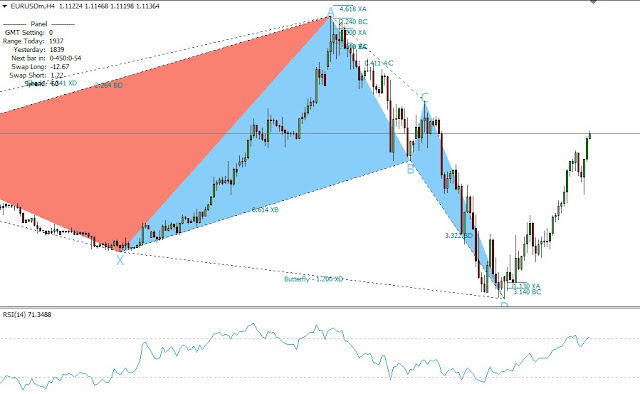
Harmonic Pattern Detection Indicator Free Download MetaTrader 4&5|Harmonic Pattern Trading Strategy

12:47 44
Harmonic Pattern Detection Indicator Free Download MetaTrader 4&5|Harmonic Pattern Trading Strategy

Harmonic Pattern Detection Indicator Free Download MetaTrader 4&5|Harmonic Pattern Trading Strategy

Download free harmonic pattern finder v3 indicator for mt4
Harmonic pattern indicator ex4
Harmonic patterns 
Shepherd harmonic pattern free download
Pz harmonic pattern indicator mt4 free download
The ultimate harmonic pattern strategy book pdf
Free harmonic scanner indicator
Harmonic patterns scanner free download

Harmonic Pattern Detection Indicator Free Download MetaTrader 4&5|Harmonic Pattern Trading Strategy

Harmonic Pattern Detection Indicator Free Download MetaTrader 4&5|Harmonic Pattern Trading Strategy

Harmonic Pattern Detection Indicator Free Download MetaTrader 4&5|Harmonic Pattern Trading Strategy


Recommendation
Use MetaTrader 4 Forex trading platform
Major, Minor and Exotic currency pairs(EUR/USD, USD/JPY, GBP/USD, AUD/USD, USD/CHF, NZD/USD and USD/CAD)
Favorite time to trade:Sydney session, Tokyo session,London session,New York session.
Best Time Frame: 1-hour charts or 4-hour chart or 24-daily chart or 1 week chart or 1 month chart
Use Best Forex Brokers:Plus500,FXTM,XTB,Alpari,OctaFX,FPMarkets,,Exness


Harmonic Pattern Detection Indicator Free Download MetaTrader 4&5

Saturday, 25 January 2020

Best Support and Resistance Indicator Pivot Point Indicator for MetaTrader 4 (MT4 ) Free Download

21:40 18
Best Support and Resistance Indicator Pivot Point Indicator for MetaTrader 4 (MT4 ) Free Download

Best Support and Resistance Indicator Pivot Point Indicator for MetaTrader 4 (MT4 ) Free Download

dynamic support and resistance indicator mt4
daily support resistance indicator
support and resistance indicator
automatic support and resistance indicator mt4
support and resistance indicator mt4 2019
automatic support and resistance indicator mt4 free download
auto pivot indicator mt4
hourly pivot point indicator mt4 


Best Support and Resistance Indicator Pivot Point Indicator for MetaTrader 4 (MT4 ) Free Download

Recommendation 
Use MetaTrader 4 Forex trading platform
Major, Minor and Exotic currency pairs(EUR/USD, USD/JPY, GBP/USD, AUD/USD, USD/CHF, NZD/USD and USD/CAD)
Favorite time to trade:Sydney session, Tokyo session,London session,New York session.
Best Time Frame:1-minute or 5-minute charts or 15-minute chart or 1-hour charts or 4-hour chart or 24-daily chart or 1 week chart or 1 month chart
Use Best Forex Brokers:Plus500,FXTM,XTB,Alpari,OctaFX,FPMarkets,Exness


Best Support and Resistance Indicator Pivot Point Indicator for MetaTrader 4 (MT4 ) Free Download

Automatic support and resistance indicator mt4 free download

Thursday, 2 January 2020

Most Popular Forex Trading System Free Download MT4 99 Best Accurate Forex Trading System

23:03 0
 Most Popular Forex Trading System Free Download MT4 99 Best Accurate Forex Trading System

Most Popular Forex Trading System Free Download MT4  99 Best  Accurate Forex Trading System

Today I have come up with a very good Forex trading system for you You can also make a lot of money by using this system in forex trading.This system draws us support & Restaurants.And with this system we also get the of Moving Average cross over, which allows us to have a very good treads.With this indicator, we can Buy and Sell Signal.best forex trading systems  free forex trading systems  99 accurate forex trading system

 Most Popular Forex Trading System Free Download MT4 99 Best Accurate Forex Trading System


 Most Popular Forex Trading System Free Download MT4 99 Best Accurate Forex Trading System

 Most Popular Forex Trading System Free Download MT4 99 Best Accurate Forex Trading System

 Most Popular Forex Trading System Free Download MT4 99 Best Accurate Forex Trading System


Recommendation
Use MetaTrader 4 Forex trading platform
Major, Minor and Exotic currency pairs(EUR/USD, USD/JPY, GBP/USD, AUD/USD, USD/CHF, NZD/USD and USD/CAD)
Favorite time to trade:Sydney session, Tokyo session,London session,New York session.
Best Time Frame:1-minute or 5-minute charts or 15-minute chart or 1-hour charts or 4-hour chart or 24-daily chart or 1 week chart or 1 month chart
Use Best Forex Brokers:Plus500,FXTM,XTB,Alpari,OctaFX,FPMarkets,Exness


Most Popular Forex Trading System Free Download MT4  99 Best  Accurate Forex Trading System

Tuesday, 31 December 2019

How to trade MACD Indicator|Moving Average|Parabolic SAR Best Forex Trading Systems Free

09:55 1
How to trade MACD Indicator|Moving Average|Parabolic SAR Best Forex Trading Systems Free

How to Trade MACD Indicator|Moving Average|Parabolic SAR Best Forex Trading Systems

Today I'm going to tell you about a very powerful system.In which we have to add three indicators, we also have the macd indicators moving average indicator with the Parabolic SAR indicators Indicator which we will rate.And it system on a very powerful signal in the system that allows us to earn a lot of profit.

How to trade MACD Indicator|Moving Average|Parabolic SAR Best Forex Trading Systems

How to trade MACD Indicator|Moving Average|Parabolic SAR Best Forex Trading Systems
Recommendation
Use MetaTrader 4 Forex trading platform
Major, Minor and Exotic currency pairs(EUR/USD, USD/JPY, GBP/USD, AUD/USD, USD/CHF, NZD/USD and USD/CAD)
Favorite time to trade:Sydney session, Tokyo session,London session,New York session.
Best Time Frame:1-minute or 5-minute charts or 15-minute chart or 1-hour charts or 4-hour chart or 24-daily chart or 1 week chart or 1 month chart
Use Best Forex Brokers:Plus500,FXTM,XTB,Alpari,OctaFX,FPMarkets,Exness


How to trade MACD Indicator|Moving Average|Parabolic SAR Best Forex Trading Systems Free Download

Sunday, 29 December 2019

Two Moving Average Indicator And Stochastic Indicator Forex Trading Strategy Download Free MT4 & MT5

11:17 0
Two Moving Average Indicator And Stochastic Indicator Forex Trading Strategy Download Free MT4 & MT5

Two Moving Average Indicator And Stochastic Indicator Forex Trading  Strategy Download Free MT4 & MT5 

Today I will tell you how to install a Moving Average Indicator With this we will put a Stochatic Indicator and let us know if the market is in the sell or on the buy. we get a very powerful signal from By Moving Average and Stochatic Indicator.

Two Moving Average Indicator And Stochastic Indicator Forex Trading Strategy Download Free MT4 & MT5

Two Moving Average Indicator And Stochastic Indicator Forex Trading Strategy Download Free MT4 & MT5
Recommendation
Use MetaTrader 4|5 Forex trading platform
Major, Minor and Exotic currency pairs(EUR/USD, USD/JPY, GBP/USD, AUD/USD, USD/CHF, NZD/USD and USD/CAD)
Favorite time to trade:Sydney session, Tokyo session,London session,New York session.
Best Time Frame:1-minute or 5-minute charts or 15-minute chart or 1-hour charts or 4-hour chart or 24-daily chart or 1 week chart or 1 month chart
Use Best Forex Brokers:Plus500,FXTM,XTB,Alpari,OctaFX,FPMarkets,Exness


Two Moving Average Indicator And Stochastic Indicator Forex Trading Strategy Download Free MT4 & MT5

Monday, 2 December 2019

Forex Buy and Sell Signals best forex accurate indicator Download Free MT4 & MT5

12:09 1
Forex Buy and Sell Signals best forex accurate indicator Download Free MT4 & MT5

Forex Buy and Sell Signals best forex accurate indicator Download Free MT4 & MT5 Forex Indicators

Forex Buy and Sell Signals best forex accurate indicator Download Free MT4 & MT5 Forex Indicators

Forex Buy and Sell Signals best forex accurate indicator Download Free MT4 & MT5 Forex Indicators

Forex Buy and Sell Signals best forex accurate indicator Download Free MT4 & MT5 Forex Indicators

Forex Buy and Sell Signals best forex accurate indicator Download Free MT4 & MT5 Forex Indicators

Recommendation

Use MetaTrader 4 Forex trading platform
Major, Minor and Exotic currency pairs(EUR/USD, USD/JPY, GBP/USD, AUD/USD, USD/CHF, NZD/USD and USD/CAD)
Favorite time to trade:Sydney session, Tokyo session,London session,New York session.
Best Time Frame:1-minute or 5-minute charts or 15-minute chart or 1-hour charts or 4-hour chart or 24-daily chart or 1 week chart or 1 month chart
Use Best Forex Brokers:Plus500,FXTM,XTB,Alpari,OctaFX,FPMarkets,Exness


Forex Buy and Sell Signals best forex accurate indicator Download Free MT4 & MT5 Forex Indicators


Friday, 29 November 2019

Lucky Star MACD,RSI Most Profitable Best Expert Advisor Forex Trading Robot

08:28 11
Lucky Star MACD,RSI Most Profitable Best Expert Advisor Forex Trading Robot

Lucky Star MACD,RSI Most Profitable Best Expert Advisor Forex Trading Robot

Lucky Star MACD,RSI Most Profitable Best Expert Advisor Forex Trading Robot

Lucky Star RSI, designed to participate in (and not just) the job of signal providers, advisors, as well as in various foreign exchange competitions, required on RSI indicators. Opens the number of orders. It can trade in a multi-currency variant See also Multi-currency Expert Advisory Signal Providers RSI and Fibonacci which have RSI indicators for Demark and Fibonacci.A series of experts: RSI and MACD, Lucky Star WPR, Lucky Star MA, Lucky Star SO, Lucky Star MACD, Lucky Star MA and SO, Lucky Star MA and MACD, Lucky Star SO and MCD Winning Real Money in Possibilities Management or Winning Bonuses in Real Accounts (read more on this in my blog). EAs can be set up under a number of rules for different competitions of different brokers, if indeed ots are allowed to trade robots. Property advisor Lucky Star has the ability to determine permission to trade robots and use the alert system. Alerts you while doing so. Alert a separate window will pop up with a sound alert, see; Alert at the Email 4 terminal will also alert you to any errors, if you mistakenly enter the account under the investment password. I logged in. The advisor will also determine the type of account (real, demo or competitive account, see screenshot) and inform you about it in the information panel.EA can trade around the clock unless you refuse it. Orders are arranged according to the indicator of the RSI (the signal can be converted to parallel and both, that is, in the first case, any first signal opens the orders; otherwise, the orders are open only. When both signals provide an initial signal), the closing orders are through action Stop loss, take profits, at the trailing stop or manually in the information panel (see screenshot), where you can turn off loss orders, profit. Profitable profits, or all active orders for all currency pairs on which the advisor is installed. Take advantage, eliminate losses, trailing stops and much higher prices, you choose yourself or set according to the rules of the competition (see blog). In the EA interface (see screenshot), you can carefully adjust the RSI indicator using different averaging methods. , Closing or opening bars (number of bars for the average), etc., using the MT4 Strategy Tester and your broker's trading history.

Recommendation

Use MetaTrader 4 Forex trading platform
Major currency pairs EUR/USD
Favorite time to trade:Tokyo session,London session,New York session.
Best Time Frame:5-minute charts or 15-minute chart or 1-hour charts
Use Best Forex Brokers: Plus500,FXTM,XTB,Alpari,OctaFX,FPMarkets,Exness


Lucky Star MACD RSI Most Profitable Best Expert Advisor Free Download
  
Free Download Forex Indicators Of Buy and Sell Best Forex Trend Trading Indicators MT4|MT5

Free Download Forex Robot Trader - Best Expert Advisor For Automated Trading


How to Read Double Tops and Double Bottoms Forex Trading Strategy For Beginners 

How To Best Trade Most Powerful Japanese Candlestick Patterns in Forex Trading 

What Is A Head And Shoulders Pattern How To Trade In Forex Market


Tuesday, 29 October 2019

Support And Resistance Zones Indicator How To Find Support And Resistance levels System|Strategy

18:44 4
Support And Resistance Zones Indicator How To Find Support And Resistance levels System|Strategy

Support And Resistance Zones Indicator How To Find Support And Resistance levels System|Strategy

Support And Resistance Zones Indicator How To Find Support And Resistance levels System|Strategy

How To Find Support And Resistance levels System|Strategy The entire trading system can be traded in any market and anywhere Time frame (which is a big advantage). Your time frame is less Select, the more you get the signal (the more trade), but logically Trades will be low (open and close fast), depending on each trader Choose the business style that suits you. The trading system is very simple and involves looking for a strong S/R levels (those that the market has tested at least once, but no Once the price hits the S / R zone (it was tested earlier)day trading support and resistance Market), I open a trading position against the market direction Use boundary orders). After that I hold the trade until the price goes up Opposite the S / R zone
 
Buy trade:

 
Price reaches strong support (should be tested at least once). over it Right now, I'm opening the shopping business. I applied the nearest TP Resistance is similar to the TPS equivalent to the TP from the SL entry price So I only use the RRR ratio.


Support And Resistance Zones Indicator How To Find Support And Resistance levels System|Strategy


Sell trade:

 
Price reaches strong resistance
(should be tested at least once). On Right now, I'm opening a sales business. I set the TP close to the top Support. SL is priced in the same quantity as the entry - TP -
Again, I only use a 1: 1 RRR ratio.


Support And Resistance Zones Indicator How To Find Support And Resistance levels System|Strategy


Last information:
 
Only strong S / R zones are displayed in the indicator. Not like other S / Rs Indicators, drawing S / R zones everywhere. That's why I like it There is a lot in the indicator, and I recommend you reduce the chart a bit as well A bit to see all the zones. support and resistance indicator For intraday trading, I have M5 or M1 chart. For swing trading I like the H1 chart the most. With this indicator, of course, you can trade in any other trading

system.The above system is just my easiest variation System. I also trade previously unselected S / R zones, but that's the style Much harder and requires more experience (I'll show a couple of them too) his trade in this thread). Of course, if you change the trade Strategy, 100% of it is up to you.

Recommendation

Use MetaTrader 4 Forex trading platform
Major, Minor and Exotic currency pairs(EUR/USD, USD/JPY, GBP/USD, AUD/USD, USD/CHF, NZD/USD and USD/CAD)
Favorite time to trade:Sydney session, Tokyo session,London session,New York session.
Best Time Frame:1-minute or 5-minute charts or 15-minute chart or 1-hour charts or 4-hour chart or 24-daily chart or 1 week chart or 1 month chart
Use Best Forex Brokers:Plus500,FXTM,XTB,Alpari,OctaFX,FPMarkets,,Exness


Support And Resistance Zones Indicator Free Download MT4|MT5 How To Find Support And Resistance levels

Wednesday, 23 October 2019

Best Moving Average Trend Zone Indicator|99 Accurate Forex Trading System

11:31 5
Best Moving Average Trend Zone Indicator|99 Accurate Forex Trading System

Best Moving Average Trend Zone Indicator|99 Accurate Forex Trading System

Best Moving Average Trend Zone Indicator|99 Accurate Forex Trading System

Best Moving Average Trend Zone Indicator Envelope Zones MT4 Indicator is a combination of two envelope indicators. This results in several zones.The first zone is limited by two slow lines red and blue This is Zone 1 in the screenshot. It represents upward and downward trends.The second zone is blue. This is Zone 2 in the screenshot. There is a positive function in this zone. When the price falls below the first zone and the blue zone, it indicates a downward trend. When the price is located above the first zone and the blue zone, it indicates an increase.The third zone is pink. This is Zone 3 in the screenshot. Maybe this is the main zone. If the price is in this zone, it is time to look at the possibility of entering the market in the direction of the trend.The fourth zone is limited by two sharp lines red and blue. This is Zone 4 in the screenshot. They have the function of over boat and over sail level.If the confidence in the third and fourth zones increases if they are confirmed / confirmed by the level of resistance or Fibonacci level.

Best Moving Average Trend Zone Indicator|99 Accurate Forex Trading System

Best Moving Average Trend Zone Indicator|99 Accurate Forex Trading System

Recommendation:
 
Use MetaTrader 4/5 Forex trading platform
Major, Minor and Exotic currency pairs:(EUR/USD, USD/JPY, GBP/USD, AUD/USD, USD/CHF, NZD/USD and USD/CAD)
Favorite time to trade:Sydney session, Tokyo session,London session,New York session.
Best Time Frame:1-minute or 5-minute charts or 15-minute chart or 1-hour charts or 4-hour chart or 24-daily chart or 1 week chart or 1 month chart
Use Best Forex Brokers:Plus500,FXTM,XTB,Alpari,OctaFX,FPMarkets,Exness


Moving Average Trend Zone Indicator|99 Accurate Forex Trading System Free Download

Tuesday, 22 October 2019

Auto Pivot Point Levels Best Support And Resistance Indicator MT4|MT5 Free Download

10:59 0
Auto Pivot Point Levels Best Support And Resistance Indicator MT4|MT5 Free Download

Auto Pivot Point Levels Best Support And Resistance Indicator MT4|MT5 Free Download

Auto Pivot Point Levels Best Support And Resistance Indicator MT4|MT5 Free Axis point is a level at which the direction of the market changes for the day. Use some simple math and the last few days high and near, a A series of points has been calculated. These tips can be helpful and Calculation of axis level, support level and resistance level of resistance Known collectively as the surface of the axis.

Auto Pivot Point Levels Best Support And Resistance Indicator MT4|MT5 Free DownloadAuto Pivot Point Levels Best Support And Resistance Indicator MT4|MT5 Free Download

Auto Pivot Point Levels Best Support And Resistance Indicator MT4|MT5 Free Download

Use MetaTrader 4 Forex trading platform
Major, Minor and Exotic currency pairs:(EUR/USD, USD/JPY, GBP/USD, AUD/USD, USD/CHF, NZD/USD and USD/CAD)
Favorite time to trade:Sydney session, Tokyo session,London session,New York session.
Best Time Frame:1-minute or 5-minute charts or 15-minute chart or 1-hour charts or 4-hour chart or 24-daily chart or 1 week chart or 1 month chart
Use Best Forex Brokers:Plus500,FXTM,XTB,Alpari,OctaFX,FPMarkets,Exness


Best Support And Resistance Indicator MT4|MT5 Free Download

Monday, 21 October 2019

Best MT4|MT5 Trend Indicator Buy Signals And Sell Signals Free Downlaod

10:53 0
Best MT4|MT5 Trend Indicator Buy Signals  And Sell Signals Free Downlaod

Best MT4|MT5 Trend Indicator Buy Signals  And Sell Signals Free Downlaod

The trend indicator is based on analysis of the average range of moving bulls and bears. It recommends trend changes, entry points and tech permits and stop loss levels. The moving panel displays a type of signal (red mean seller / blue mean buyer) that enter the price.

Best MT4|MT5 Trend Indicator Buy Signals  And Sell Signals Free Downlaod

Best MT4|MT5 Trend Indicator Buy Signals  And Sell Signals Free Downlaod

Best MT4|MT5 Trend Indicator Buy Signals  And Sell Signals Free Downlaod
Recommendation
Use MetaTrader 4/5 Forex trading platform
Major, Minor and Exotic currency pairs(EUR/USD, USD/JPY, GBP/USD, AUD/USD, USD/CHF, NZD/USD and USD/CAD)
Favorite time to trade:Sydney session, Tokyo session,London session,New York session.
Best Time Frame:1-minute or 5-minute charts or 15-minute chart or 1-hour charts or 4-hour chart or 24-daily chart or 1 week chart or 1 month chart
Use Best Forex Brokers:Plus500,FXTM,XTB,Alpari,OctaFX,FPMarkets,Exness


Trend Indicator Buy Signals  And Sell Signals Free Downlaod

Sunday, 20 October 2019

Free Download Forex Robot Trader - Best Expert Advisor For Automated Trading

10:39 1
Free Download Forex Robot Trader - Best Expert Advisor For Automated Trading

Free Download Forex Robot Trader - Best Expert Advisor For Automated Trading

 
Forex Real Profity Robot is a very important step. After installing the robot, restart MetaTrader 4 and go to the Navigation Pane on the left. Clicking on the small will expand the Expert Advisors section and reveal the robots you have installed, including Forex Rail Protection.Note: Please note that the Forex EarlProperty e-icon is gray, while the other icons in the list are colored. This is quite normal. There are colorful icons like Open Source Expert Advisors, like Moving Average. Forex Araliprofetia has a gray icon because its source code is not open (robot is protected).
You will need any open M15 chart to start trading. You can either use an existing chart or open a new one, but be sure to set the M15 time frame by clicking the "M15" button in MetaTrader 4. Right-click on the Forex Rail Protocol icon and drag it onto the chart. Changing the time range when the robot is already connected is not an issue.Note: You can change this at any time, but do not allow Forex Real Profit to be traded on other time frames, as this can be risky and can cause major losses.
We recommend that you use Forex Real Profitia with the following pairs:URCHF, USDCAD, USDCF, Our couple has the best performance with this couple. The other two pairs are good results CADCHF and GBPCHF.There is no limit to the use of robots with any couple, but we strongly advise you to test any pair directly before trading, and select the best ones for live trading.Couples other than the recommended ones work best with the "trend filter" set "true".When you leave Forex Relativity on the chart, the "Properties" dialog will open and one of the two windows below (normal or inputs) will pop up (depending on which one was used at the end).


UseStopLoss
This setting is used to stop the losses when an open order develops against you. You can either choose to use the Stop Loss or not. If you set this parameter to “false” the ForexRealProfitEA will not let you loose all the money from the account. It has a dynamic Stop Loss in its code that will close a loosing position at a certain time. If you choose to set the UseStopLoss to “false”, we recommend you to make back tests to see if the performance of the robot is acceptable to you with this setting.Our recommendation is to set the UseStopLoss to “true”.


UseTakeProfit
This setting is used to close a winning position at a certain number of pips. You can either choose to use the Take Profit or not. If you set this parameter to “false” the ForexRealProfitEA will still close the winning positions following its dynamic Take Profit algorithm.
Our recommendation is to set the UseTakeProfit to “true”.


Set_Lots
This setting defines the dimension of the open position when money management is not used. This parameter has no effect if Money Management is set to “true”.
Note: You have to check if the lot size you intend to use is allowed by the broker. If the lot size you intend to use is not permitted by the broker (it is lower then the minimum permitted lot size or exceeds the maximum permitted lot size), the lot size will be adjusted automatically to the assessed limits. For example, if are you want to as set the lot size to 1 micro lot (0.01 lots), check if your account allows micro lot trading.Recommended SetLots is 0.01 (1 microlot) for each $150-$200 of you account balance.
Example given: If are your as account balance is between $450 and $600 recommended SetLots is 0.03


MoneyManagement
Money management is a system that automatically calculates the size of the open positions according to the account’s balance.Our recommendation is to set MoneyManagement on “true” because it produces more consistent profits.Option This option calculates the risk according to Account Balance, Account Equity or Account Free Margin. Its settings are as follows:
1 – Account Balance
2 – Account Equity
3 – Account Free Margin
Default MM_Option is 1 (risk calculated based on the account’s balance).
This option is extremely helpful in selecting between conservatory and aggressive risk strategy or once exploitation multiple knowledgeable advisors on constant account.

Risk percent
It calculates the size of the next open position according to the stop loss value.
This value defines the maximum amount of money (in percentage) of your current Account Balance, Account Equity or Account Free Margin (depending on MM_Option) that you can loose on a
single trade for an explicit combine once the stop loss is hit.

Example given: Risk percent=5 and Set_StopLoss=100; ForexRealProfitEA will loose 5% of the money if 100 pips stop loss is hit;

Recommendation
Use MetaTrader 4 Forex trading platform
Major, Minor and Exotic currency pairs(EUR/USD, USD/JPY, GBP/USD, AUD/USD, USD/CHF, NZD/USD and USD/CAD)

Timeframe: M15
Favorite time to trade:Sydney session, Tokyo session,London session,New York session.
Best Time Frame: 15-minute chart or 1-hour charts
Use Best Forex Brokers:Plus500,FXTM,XTB,Alpari,OctaFX,FPMarkets,Exness


Free Download Forex Robot Trader - Best Expert Advisor For Automated Trading

Saturday, 19 October 2019

Free Download Forex Indicators Of Buy and Sell Best Forex Trend Trading Indicators MT4|MT5

10:25 1
Free Download Forex Indicators Of Buy and Sell Best Forex Trend Trading Indicators MT4|MT5

Free Download Forex Indicators Of Buy and Sell Best Forex Trend Trading Indicators MT4|MT5

Free Download Forex Indicators Of Buy and Sell Best Forex Trend Trading Indicators MT4|MT5

Free Download Forex Indicators Of Buy and Sell Forex Trend free displays the trend direction, duration, intensity and the resulting trend rating for all time frames in real time.You'll see at a glance at which direction the trends are running, how long they last and how powerful they are.All this makes it an easy-to-use trend trading system for beginners, advanced and skilled traders.Forex Trend free may be a feature restricted version of our distinctive analysis masterpiece Forex Trend.

Free Download Forex Indicators Of Buy and Sell Best Forex Trend Trading Indicators MT4|MT5

Free Download Forex Indicators Of Buy and Sell Best Forex Trend Trading Indicators MT4|MT5
Use MetaTrader 4 Forex trading platform
Major, Minor and Exotic currency pairs:(EUR/USD, USD/JPY, GBP/USD, AUD/USD, USD/CHF, NZD/USD and USD/CAD)
Favorite time to trade:Sydney session, Tokyo session,London session,New York session.
Best Time Frame:1-minute or 5-minute charts or 15-minute chart or 1-hour charts or 4-hour chart or 24-daily chart or 1 week chart or 1 month chart
Use Best Forex Brokers:Plus500,FXTM,XTB,Alpari,OctaFX,FPMarkets,Exness


Free Download Forex Indicators Of Buy and Sell Best Forex Trend Trading Indicators MT4|MT5

Friday, 18 October 2019

Profitable 3 Moving Average Crossover Strategy|Best Moving Average Indicator MT4|MT5 Free Download

15:23 0
Profitable 3 Moving Average Crossover Strategy|Best Moving Average Indicator MT4|MT5 Free Download

Profitable 3 Moving Average Crossover Strategy|Best Moving Average Indicator MT4|MT5 Free Download

Profitable 3 Moving Average Crossover Strategy|Best Moving Average Indicator MT4|MT5 Free Download
Profitable 3 Moving Average Crossover Strategy moving average helps cut down the amount of "noise" on a price chart. Look at the direction of the moving average to get a basic idea of which way the price is moving. If it is angled up, the price is moving up (or was recently) overall; angled down, and the price is moving down overall; moving sideways, and the price is likely in a range.

Profitable 3 Moving Average Crossover Strategy|Best Moving Average Indicator MT4|MT5 Free Download


Profitable 3 Moving Average Crossover Strategy|Best Moving Average Indicator MT4|MT5 Free Download

Recommendation

Use MetaTrader 4 Forex trading platform
Major, Minor and Exotic currency pairs:(EUR/USD, USD/JPY, GBP/USD, AUD/USD, USD/CHF, NZD/USD and USD/CAD)
Favorite time to trade:Sydney session, Tokyo session,London session,New York session.
Best Time Frame:1-minute or 5-minute charts or 15-minute chart or 1-hour charts or 4-hour chart or 24-daily chart or 1 week chart or 1 month chart
Use Best Forex Brokers:Plus500,FXTM,XTB,Alpari,OctaFX,FPMarkets,FPMarkets,Exness